A new server opens on the Finish setup checklist. Each step ticks itself when it is done, so you always see what is left.
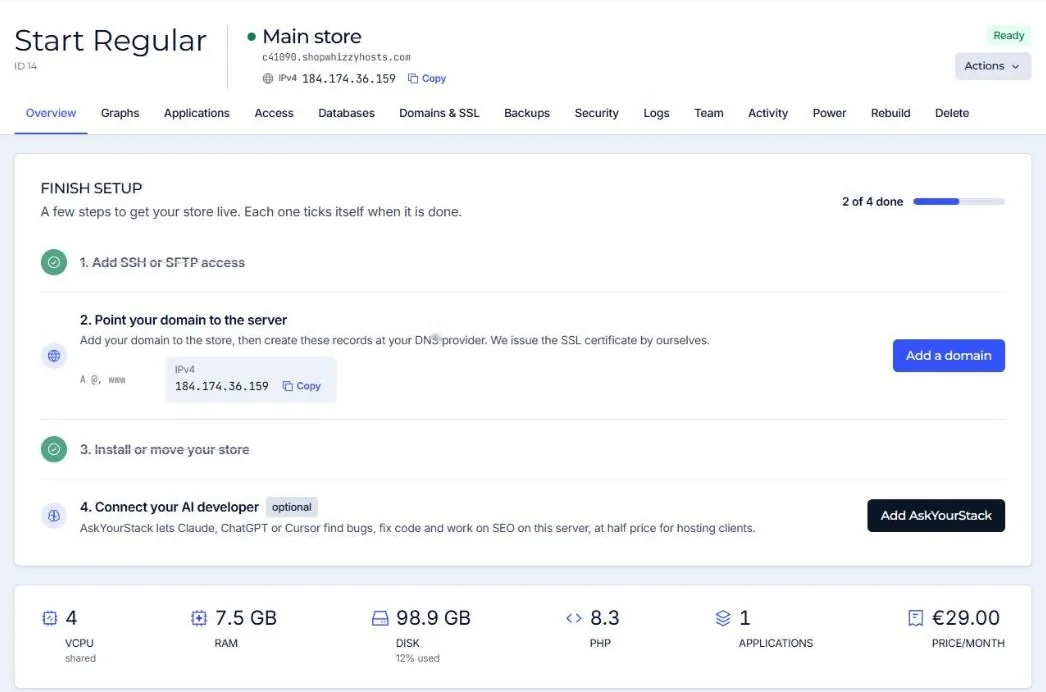
- Add SSH or SFTP access
Create a user for yourself or your developer, with a public key (recommended) or a password. The user belongs to one application and only sees its folder. See SFTP and SSH users.
- Point your domain to the server
Add your domain to the application, then create the records shown (an A record for
@andwwwwith the server's IPv4 address) at your DNS provider. As soon as the domain reaches the server we issue the SSL certificate ourselves. See Point your domain. - Install or move your store
If you picked a platform, it is already installed. Otherwise install one from the Applications tab, upload your own code, or ask us to move your store (free).
- Connect your AI developer (optional)
AskYourStack connects Claude, ChatGPT or Cursor to the server so they can read logs, fix code and work on SEO with you. Hosting clients get it at half price.
A free address while DNS is not ready
Every application gets a working address under the server's own name, such as shop.c12345.shopwhizzyhosts.com, with SSL. You can install, test and show the store there before your domain moves.
Lower the TTL of your DNS records to 300 seconds a day before you switch. The move then takes minutes instead of hours.
Did this solve it? If not, tell us what you see and we look at your server.
Open a ticket