Your domain stays wherever it is registered. You only change where it points: one A record for the bare domain and one for www.
- Add the domain to the application
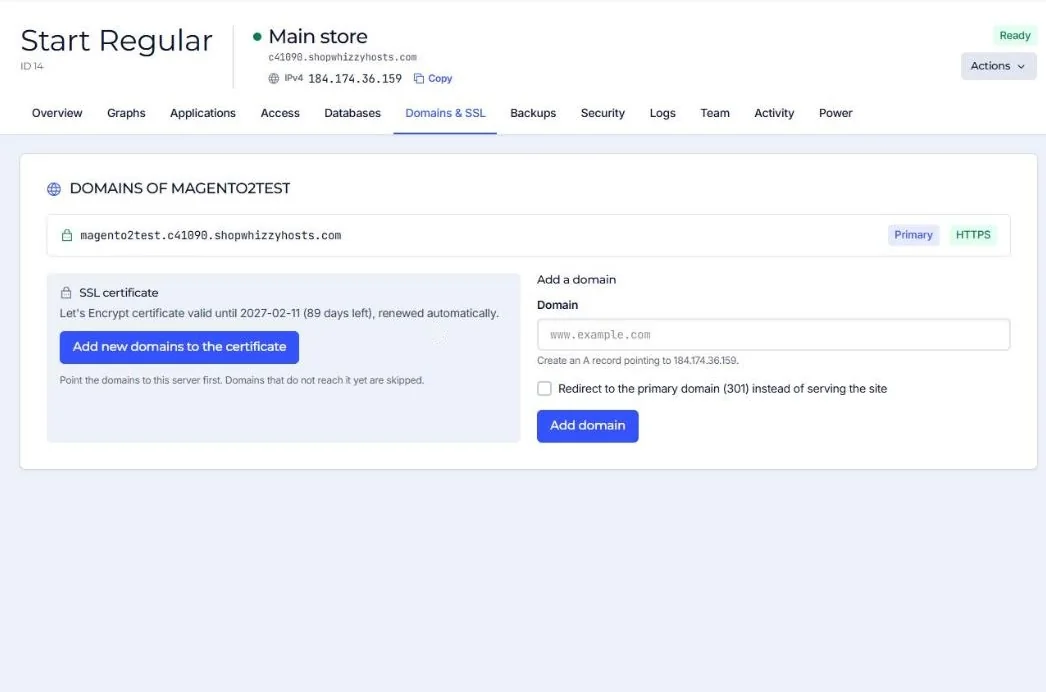
Open the application, go to Domains & SSL and add the domain (for example
www.example.com). Add the bare domain too, as an alias or as a redirect to www. - Create the DNS records
At your DNS provider, create an A record for
@and one forwwwwith the server's IPv4 address, shown in the console with a Copy button. If the server has an IPv6 address you can add matching AAAA records. - Wait for DNS
Usually minutes; up to a few hours if the old records had a long TTL.
- SSL is issued for you
When the domain reaches the server, open Domains & SSL and press Add new domains to the certificate. Domains that do not reach the server yet are skipped and you can try again later. Certificates renew on their own.
Example records
| Type | Name | Value | TTL |
|---|---|---|---|
| A | @ | 203.0.113.10 (your server's IPv4) | 300 |
| A | www | 203.0.113.10 | 300 |
Using Cloudflare? Create the same records there. You can keep the orange cloud (proxy) on; the server sees your visitors' real addresses. See Using Cloudflare.
Do not change the MX records unless you also move your email. Web and email are separate: pointing the website to ShopWhizzy does not move your mailboxes.
Check that it worked
Open the domain in a private window. You should see the store with a padlock. From a terminal:
dig +short www.example.com
# should print your server's IPv4 address
Did this solve it? If not, tell us what you see and we look at your server.
Open a ticket