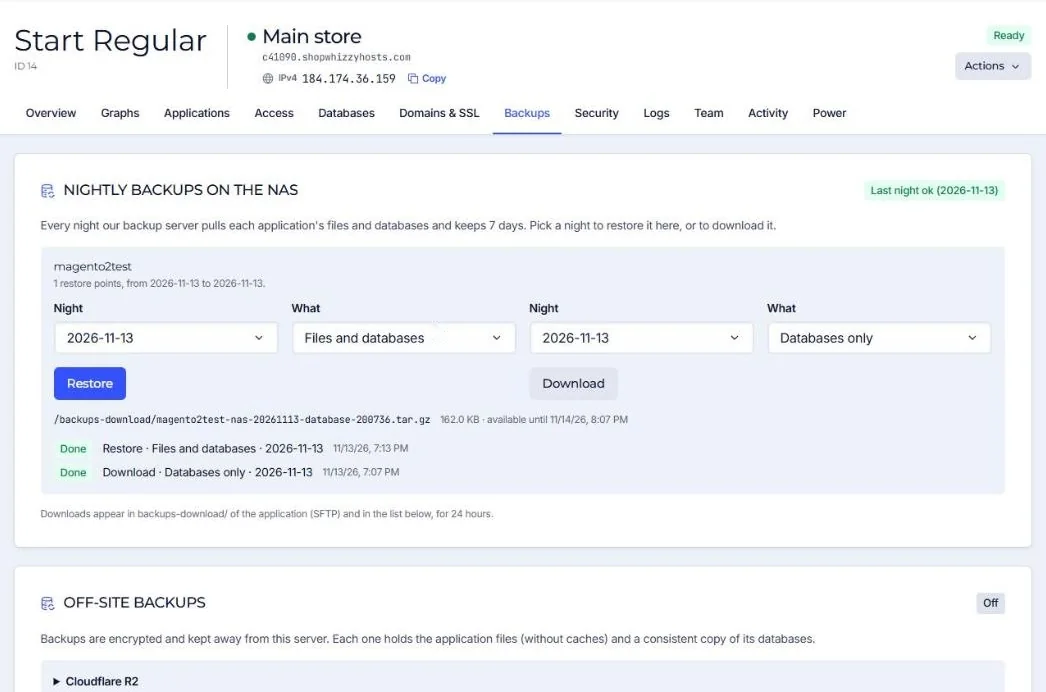
Restores are done from the Backups tab, per application. You choose the night and what to bring back: everything, the files only or the databases only.
- Open Backups and find the application
Each application lists its restore points (one per night, up to 7).
- Choose the night
Pick the last good night: before the bad change, the deleted product or the infection.
- Choose whatFiles and databases, Files only or Databases only.
- Press Restore
The NAS delivers the restore point to the server, usually within minutes. A safety copy of the current database is taken first. Then the files and/or databases are put back.
- Check the store
Magento code is rebuilt (compile and static content) into a new release, and caches are flushed.
Which option?
| Situation | Restore |
|---|---|
| A deploy or extension broke the store | Files only (orders since then are kept) |
| Products or settings deleted by mistake | Databases only, or download the database and copy the rows you need |
| Store hacked | Files only from before the infection, then clean the database (see hacked store) |
| Everything is broken | Files and databases |
Restoring a database replaces it completely: orders, customers and changes made after that night are gone. When in doubt, download the database first and restore only what you need, or ask us.
Did this solve it? If not, tell us what you see and we look at your server.
Open a ticket