The firewall closes every port that is not needed. The Security tab shows what is open and lets you add rules.
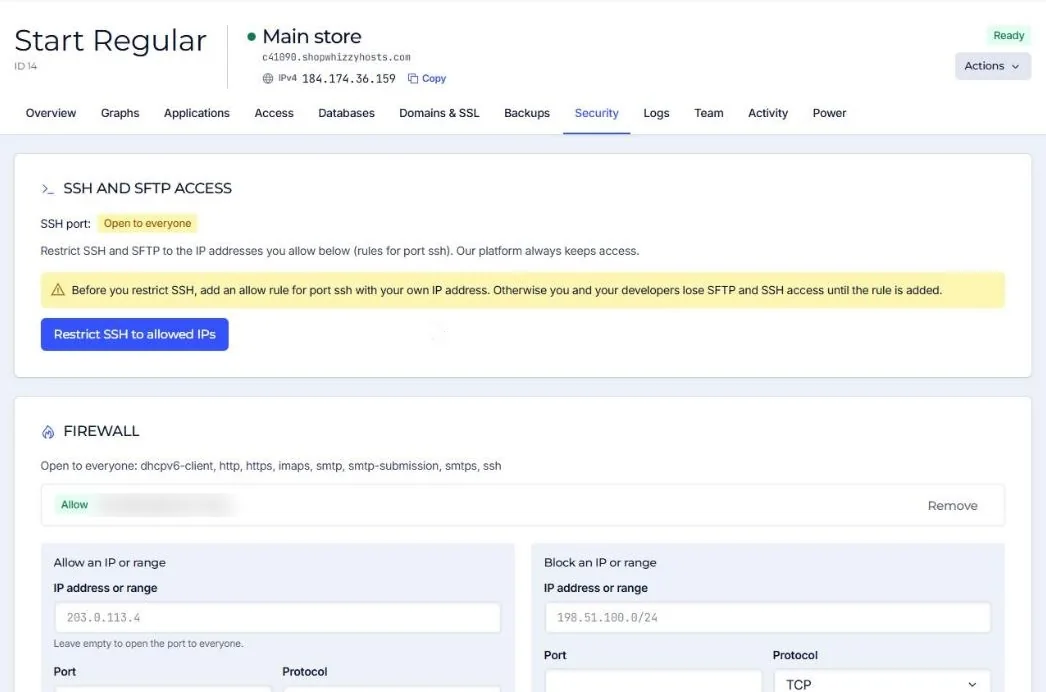
Open to everyone by default: web (http, https), SSH, and the mail ports when email is set up (smtp, submission, smtps, imaps).
| Rule | Example | Use it for |
|---|---|---|
| Allow an IP or range on a port | 203.0.113.4 on 22/tcp | Let your office reach SSH after restricting it, or an ERP reach MariaDB. |
| Open a port to everyone | Leave the address empty | A service that must be public. Ask us first. |
| Block an IP or range | 198.51.100.0/24, all ports | An attacker that keeps coming back from one network. |
Blocking at the firewall affects every application and SSH. To refuse a bot on one store only, use Protection blocks.
Did this solve it? If not, tell us what you see and we look at your server.
Open a ticket