Stores are hit by crawlers, scrapers and botnets every day. The worst ones request thousands of filtered category pages (layered navigation), each one built by PHP. Protection keeps them from taking the server down, without getting in the way of customers or search engines.
The layers
| Layer | What it does | Visitors who hit it see |
|---|---|---|
| Limit per address | Each address may ask for a number of pages per second (10 by default). Bursts are allowed. Images and files are never counted. | A 429 Too Many Requests for a moment. |
| Limit per shop for filtered pages | All addresses together may open a number of filtered pages per second (12 by default). This is what stops botnets with thousands of addresses. | A 429 for filtered pages only. |
| Filters per URL | A crawler asking for a page with more filters than allowed (3 by default) is refused. People are only counted. | Crawlers: refused. People: nothing. |
| Refused tools | Attack tools and scrapers are refused. Optionally SEO tools, smaller search engines and AI crawlers too. | The connection is closed (444). |
| Browser check | A short page that sets a cookie with JavaScript, then reloads. Real browsers pass in a moment; bots do not. | Checking your browser, one moment. |
| Blocks | Addresses, networks, user agents and countries you refuse. | The connection is closed (444). |
Search engines and payments are safe
- Google and Bing are recognised by their published addresses (checked daily) and are never limited or checked.
- APIs, payment callbacks, feeds and sitemaps are never refused or checked, so payments, marketplaces and shopping feeds keep working.
- Logged-in customers and the admin are not filtered pages and are not slowed down.
The settings
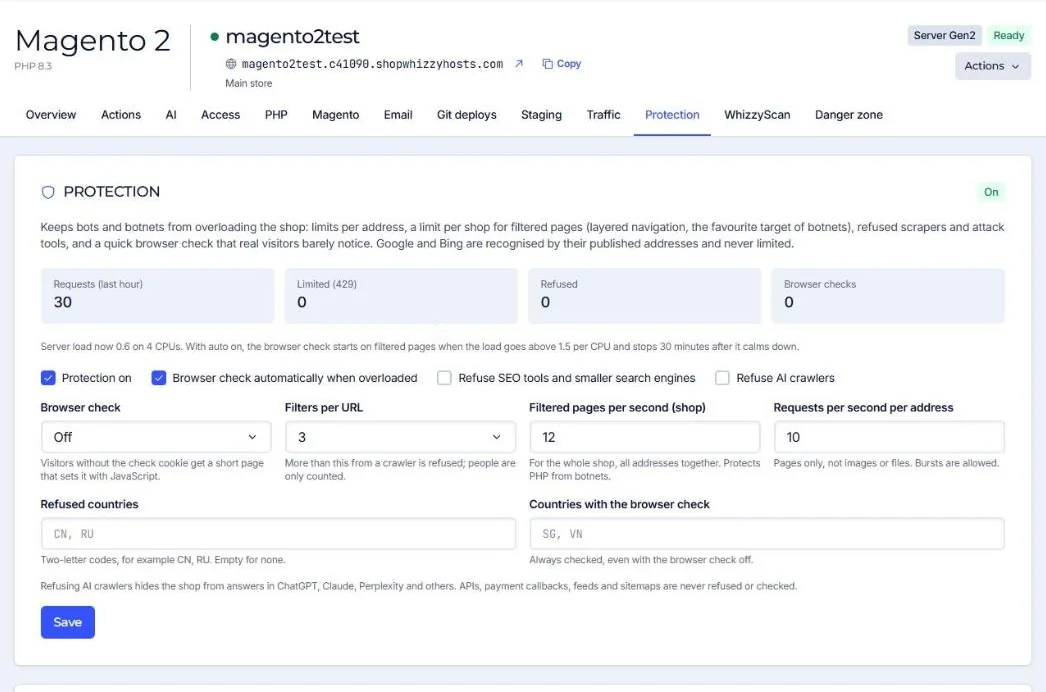
| Setting | Default | When to change it |
|---|---|---|
| Protection on | On | Keep it on. |
| Browser check automatically when overloaded | On | Keep it on: see the browser check. |
| Browser check | Off | Filtered pages during a bot wave; the whole site only during an attack. |
| Filters per URL | 3 | Raise it if your customers really combine many filters. |
| Filtered pages per second (shop) | 12 | Raise it for very busy stores on large servers. |
| Requests per second per address | 10 | Raise it if many customers share one address (offices, schools). |
| Refuse SEO tools and smaller search engines | Off | Turn on if SEO crawlers load your store and you do not use them. |
| Refuse AI crawlers | Off | Refusing them hides the store from answers in ChatGPT, Claude, Perplexity and others. |
| Refused countries / Countries with the browser check | Empty | Two-letter codes, for example CN, RU. Only if you do not sell there. |
Protection works for every application on the server, Magento or not. WordPress and WooCommerce get the same limits and checks.
Did this solve it? If not, tell us what you see and we look at your server.
Open a ticket