Every application runs its own PHP version. Two stores on the same server can use PHP 7.4 and PHP 8.4 at the same time.
Available versions: 7.4, 8.0, 8.1, 8.2, 8.3 and 8.4, with the extensions Magento, WordPress and the other platforms need (bcmath, gd, intl, mbstring, soap, zip, Redis, Imagick, APCu and more).
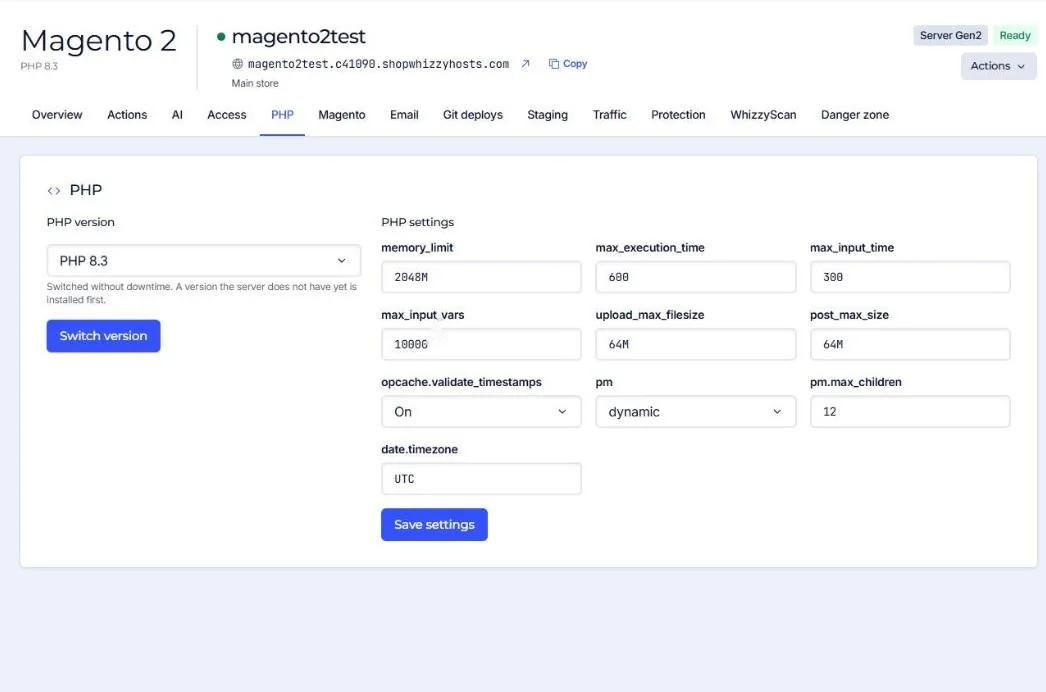
- Open the PHP tab of the application
It shows the current version and the PHP settings.
- Pick the new version and press Switch version
If the server does not have that version yet, it is installed first, then the application moves over. Visitors do not notice: the old pool keeps serving until the new one is ready.
- Test the site
Check the front, the admin and the checkout. If something breaks, switch back the same way.
Which version should I use?
| Platform | Recommended |
|---|---|
| Magento 2.4.7 and 2.4.8, Mage-OS | PHP 8.3 |
| Magento 2.4.6 | PHP 8.2 |
| Magento 2.4.4 and 2.4.5 | PHP 8.1 |
| WordPress and WooCommerce | PHP 8.3 |
| PrestaShop 8 | PHP 8.1 |
| Laravel 11 and 12 | PHP 8.3 |
Old versions such as 7.4 and 8.0 no longer get security fixes from PHP itself. Use them only while you upgrade the store.
Did this solve it? If not, tell us what you see and we look at your server.
Open a ticket