An application is one site on your server, with its own Linux user, folder, PHP pool, domains, databases and logs. One server can hold many.
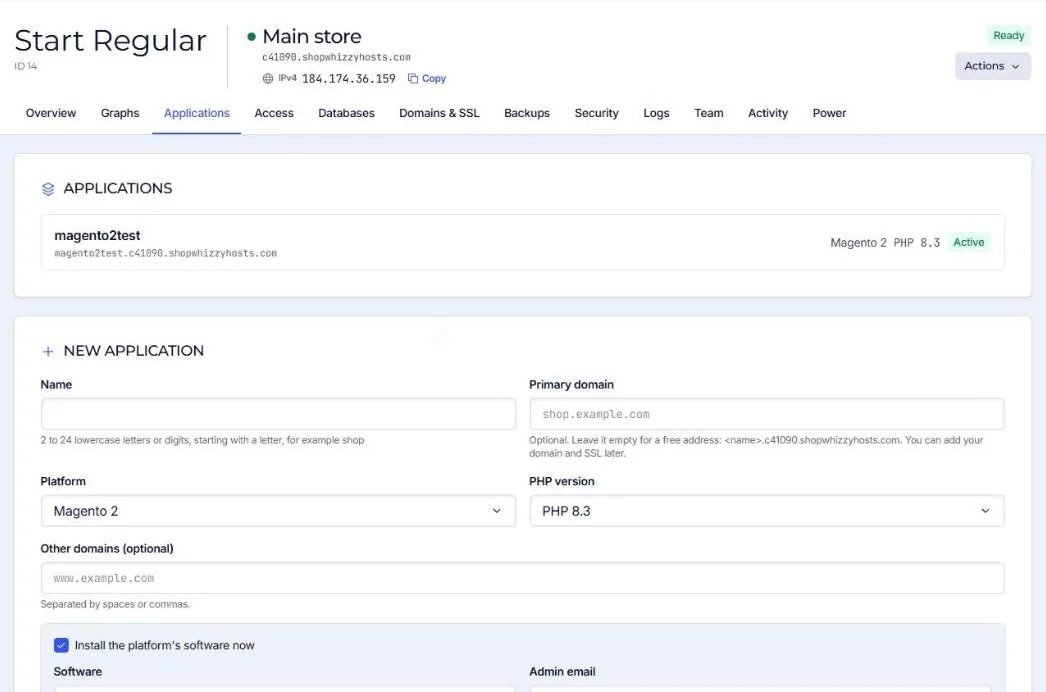
- Open the server and go to Applications
The list shows the applications already on the server.
- Fill in New application
Name: 2 to 24 lowercase letters or digits, starting with a letter (for example
shop). It becomes the folder/srv/apps/shopand the Linux userapp_shop.Primary domain: optional. Leave it empty for a free address such as
shop.c12345.shopwhizzyhosts.comand add your domain later.Platform and PHP version: the platform sets sensible PHP defaults (memory, timeouts, workers).
- Install the software now (optional)
Tick Install the platform's software now to get WordPress, WooCommerce, Mage-OS, Magento Open Source, PrestaShop or Laravel installed with a database and an admin account. Leave it unticked to upload your own code.
- Create
The application is ready in seconds; an install runs as a job for a few minutes.
Platforms
| Platform | Web root | Notes |
|---|---|---|
| Magento 2 / Mage-OS | pub | Releases folder for zero-downtime deploys, Magento cron, Redis and optional Varnish. |
| WordPress / WooCommerce | the application folder | Pretty permalinks, uploads and cache folders ready. |
| PrestaShop | the application folder | |
| Shopware | public | |
| Laravel | public | Releases folder, scheduler and queue friendly. |
| PHP | the application folder | Any other PHP site or a static site. |
Running the same form again on an application that was only partly created repairs it. Nothing is lost.
Did this solve it? If not, tell us what you see and we look at your server.
Open a ticket