Varnish keeps ready-made pages in memory and serves them without running PHP. Pages load much faster and the server handles many more visitors.
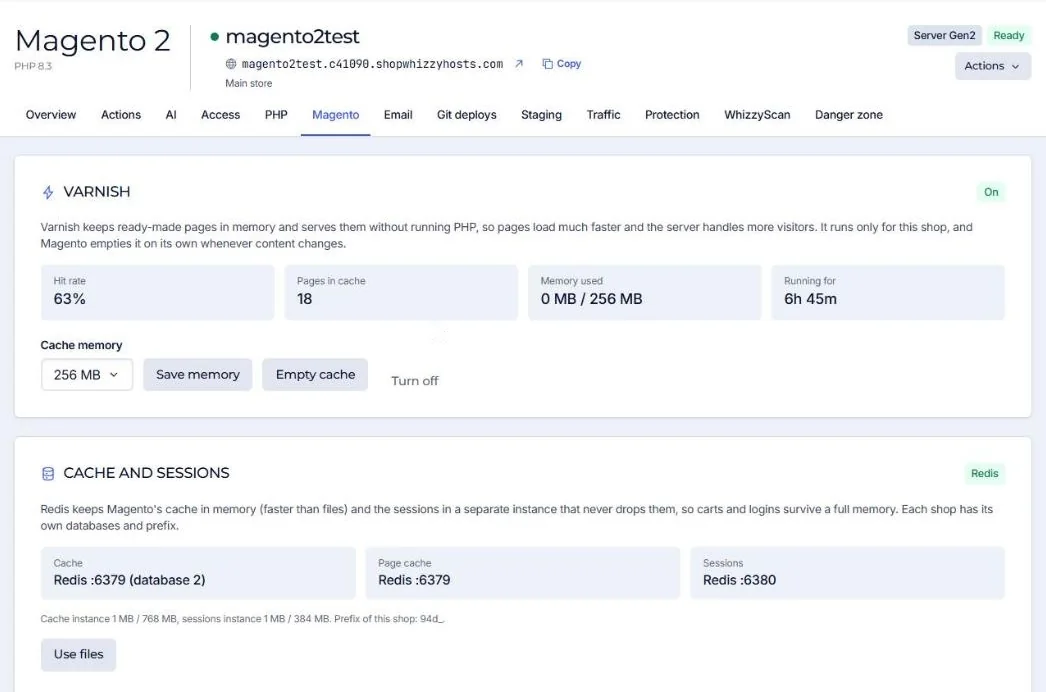
- Turn it on
Magento tab, Varnish, choose the cache memory (256 MB is a good start) and turn it on. Each store gets its own Varnish instance.
- Magento is switched for you
The full page cache application is set to Varnish and Magento's purge settings point to it. Magento empties pages on its own when products, categories or CMS pages change.
- Watch the hit rate
After a day of traffic a healthy store shows 70 to 95%.
Good to know
- Empty cache clears Varnish completely. Normally not needed: Magento purges changed pages itself.
- Carts, checkout, customer account and admin pages are never cached.
- A staging copy never uses the live store's Varnish.
- Turn off goes back to Magento's built-in page cache (in Redis).
A low hit rate usually means a module adds a cookie or a uncacheable block to every page. Ask us to look: it is often a one-line fix.
Did this solve it? If not, tell us what you see and we look at your server.
Open a ticket