Magento stores on Gen2 keep their cache in Redis by default. Redis is memory: much faster than files and lighter on the disk.
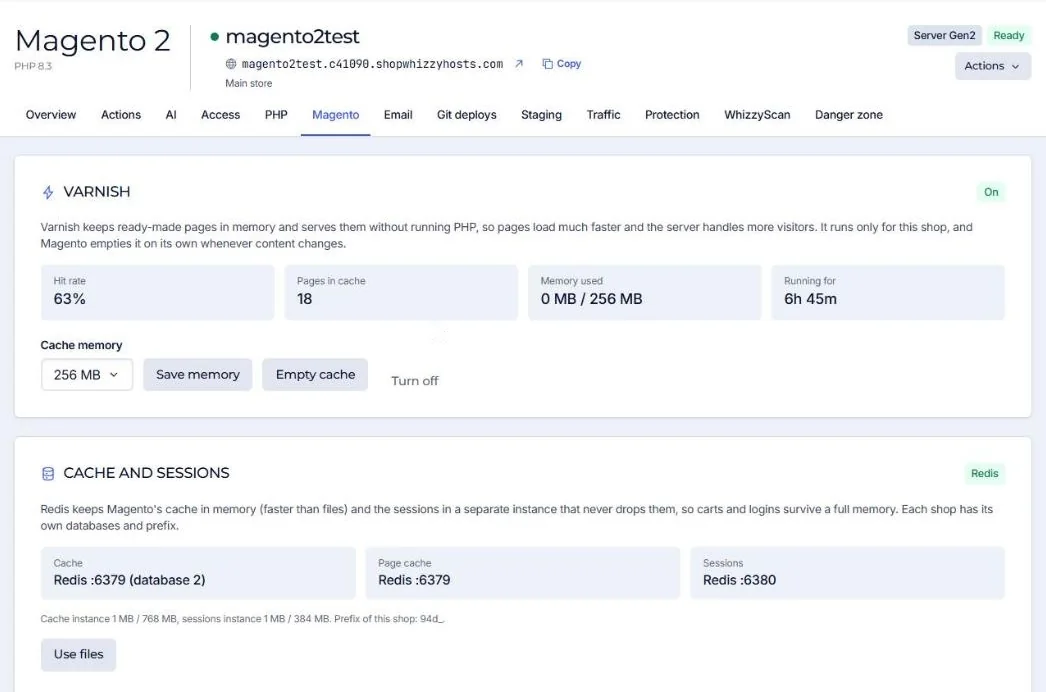
How it is set up
| Instance | Port | Behaviour |
|---|---|---|
| Cache | 6379 | When memory is full it drops the least used keys. Nothing is written to disk. |
| Sessions | 6380 | Never drops anything and writes to disk, so carts and logins survive a full memory or a restart. |
Each shop gets its own database numbers and its own key prefix (id_prefix), so two stores on the same server never mix their cache, and flushing one never empties the other.
Switch to files and back
The Use files button moves cache and sessions back to files, for example while debugging an extension. Use Redis moves them back. Both edit app/etc/env.php for you.
Flushing the cache from the Actions tab empties only this shop's databases.
Did this solve it? If not, tell us what you see and we look at your server.
Open a ticket