Databases belong to an application. Each database user gets access to exactly the databases you choose, nothing else.
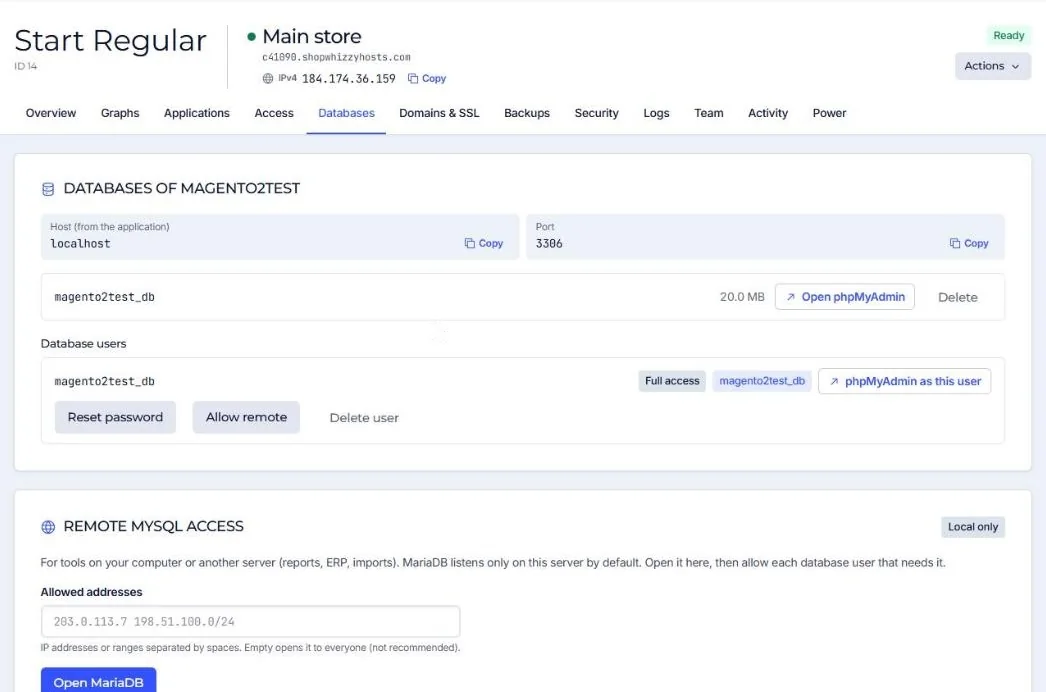
| Action | Notes |
|---|---|
| Create a database | UTF8MB4, the right character set for every modern store. Optionally with a user that has full access to it. |
| Create a user | Choose its databases and its access level. |
| Reset password | A new password is generated (or set your own) and shown once. |
| Delete a database | Drops it. Users keep existing but lose access to it. |
| Allow remote | Lets this user connect from outside the server, once MariaDB is open to the outside (see Remote MySQL). |
Applications connect to localhost, port 3306. The connection details of a store are in its configuration file (app/etc/env.php, wp-config.php or .env).
Deleting a database cannot be undone except from a backup. Download it first if you are not sure.
Did this solve it? If not, tell us what you see and we look at your server.
Open a ticket