When it comes to magento, working with composer is always an advantage.
Composer allows to easily update and manage your magento module and all required dependencies.
In this example, we want to install Delete Orders from Vnecoms.
Find the module in Magento Markeplace and checkout. That specific modules is free.
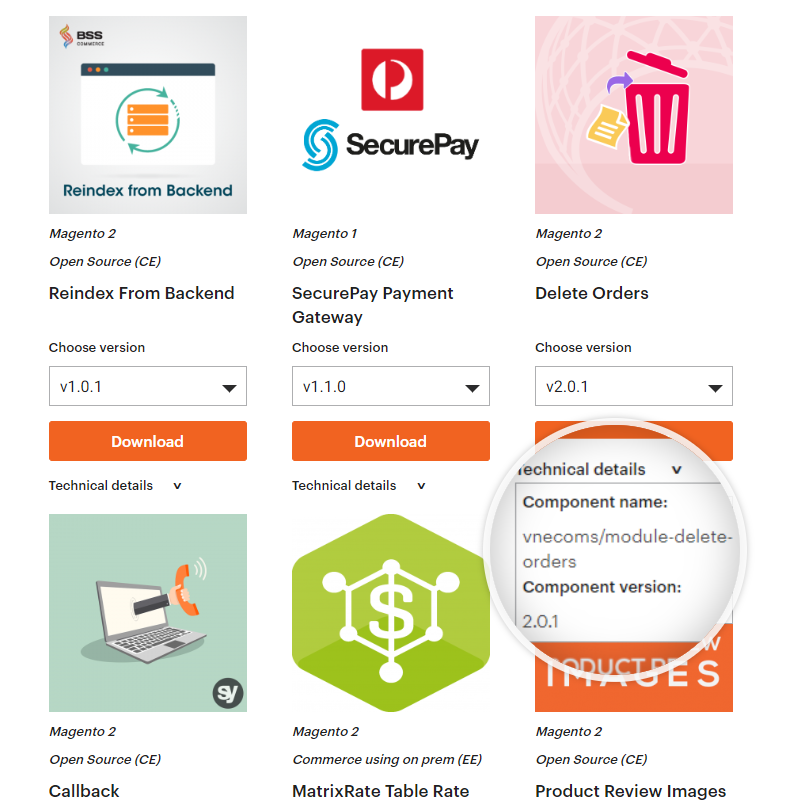
Once you submit order go to My Downloads section and find it.
Click in Technical details and copy/paste the component name.
In our example will be vnecoms/module-delete-orders.
Open your server ssh console (with Putty per example) and magento root folder do:
composer require vnecoms/module-delete-orders
Sometimes there are variations like per example:
/opt/rh/rh-php71/root/usr/bin/php -d memory_limit=-1 /usr/bin/composer require vnecoms/module-delete-orders
In case of doubt, ask your host provider the binaries paths for composer and desired php version.
Install should run without issues.
Once installed, run setup:upgrade, setup:di:compile and setup:static-content:deploy.
Next time you need to update the module do:
composer update vnecoms/*
to update all vnecoms modules
composer update vnecoms/module-delete-orders
to update just Delete Orders module
or in case you need a specifi version
composer update vnecoms/module-delete-orders=2.0.1
Did this solve it? If not, tell us what you see and we look at your server.
Open a ticket