Each application has one primary domain and as many extra domains as you need. An extra domain is either an alias (shows the same site) or a redirect (sends visitors to the primary domain with a 301).
| Kind | Use it for |
|---|---|
| Primary | The address the store uses for its links, for example www.example.com. |
| Redirect (301) | The bare domain, old domains and typo domains: visitors and search engines go to the primary domain. |
| Alias | A second address that shows the same site, for example a language domain handled by the store itself. |
- Add the domain
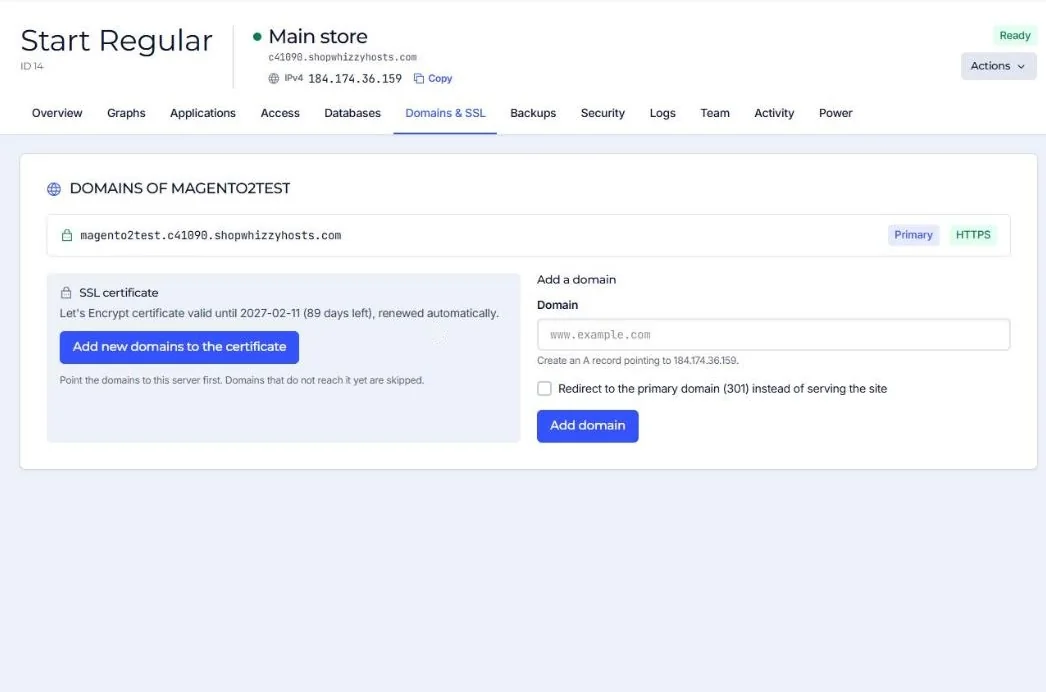
Domains & SSL, Add a domain. Tick Redirect to the primary domain (301) for redirects.
- Create the DNS record
An A record pointing to the server's IPv4 address.
- Add it to the certificate
Press Add new domains to the certificate once DNS points to the server.
For SEO pick one version (with or without www) as primary and redirect the other.
Did this solve it? If not, tell us what you see and we look at your server.
Open a ticket