PolyShell is a flaw that lets anyone, without logging in, upload a file into a Magento store through the REST API for guest carts. The file lands in pub/media/custom_options/quote/ with the name the attacker chose, for example index.php or index.phar. Inside it is a PHP payload hidden behind a fake image header, so it passes the upload check.
We saw it live today on a store we manage: about a hundred new files in a few hours, in five different extensions. This post explains how to check your own store and how to close the door with three layers, so that one mistake in one of them does not leave you exposed.
location ^~ /media/custom_options/ { deny all; }What PolyShell does
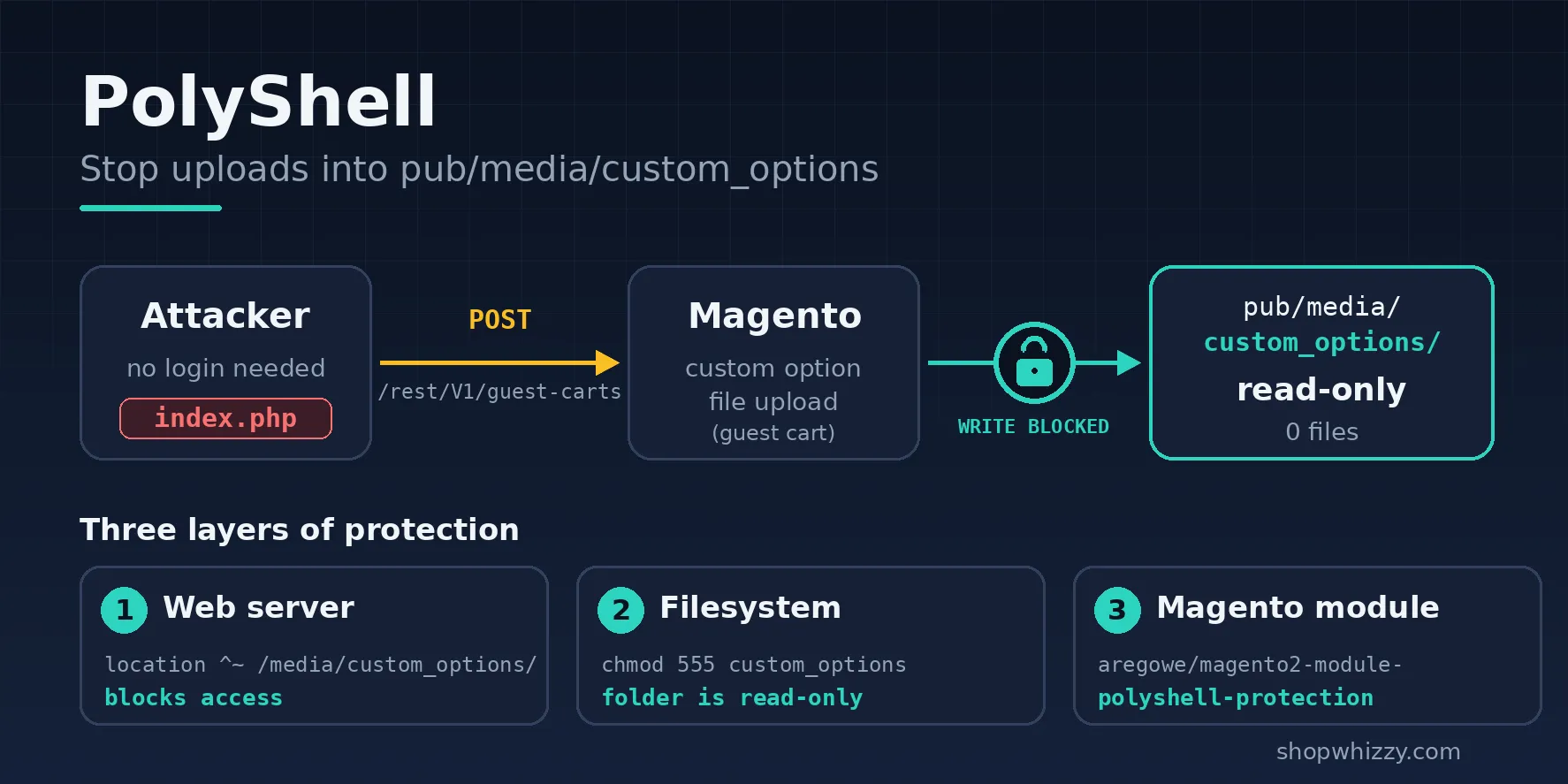
The attacker creates a guest cart with a POST to /rest/V1/guest-carts, adds an item, and sends a file as a custom option. Magento stores it under pub/media/custom_options/quote/, keeping the file name. The next requests are plain GET calls to that path, to see whether the web server will run it.
Whether it becomes code execution depends on your web server. If PHP is allowed to run inside pub/media, the uploaded file is a webshell. On the store we looked at, the web server refused to run the files, so nothing executed, but the files were still there and the attack kept going. A patch from Adobe is the real fix, and these layers do not replace it.
How to check your store
Run these from the Magento root. The first lists anything inside the folder, the second looks for PHP code inside the media folder, and the third shows the attacker's requests in the access log (adjust the log path).
find pub/media/custom_options -type f ! -name .htaccess
grep -rl '<?php' pub/media/
grep 'POST /rest/V1/guest-carts' /var/log/nginx/access.log | tail
A normal store has no files in custom_options besides .htaccess, and no PHP inside pub/media. Any result means the store was probed, and a PHP result means you should treat it as compromised.
Close the door in three layers
1. Web server: deny the folder
Add this to the nginx config of the store, before the location ~ \.php$ block, so it takes priority:
location ^~ /media/custom_options/ { deny all; }On servers we run with our hosting stack, this rule is already part of the default configuration. If nginx answers that the location is a duplicate, the rule already exists and you do not need to add it.
2. Filesystem: make the folder read-only
Magento only writes there when a product has a custom option of type file. Check whether yours do:
SELECT COUNT(*) FROM catalog_product_option WHERE type = 'file';If the result is 0, remove the write permission so no upload can create a file, even if something else fails:
chmod -R 555 pub/media/custom_options3. Magento: two modules
Two free modules from Packagist stop the upload inside Magento itself:
aregowe/magento2-module-polyshell-protection: blocks uploads intocustom_optionsand polyglot files. It includes the earliermarkshust/magento2-module-polyshell-patch, so you do not need both.basecom/magento2-disable-customer-address-file-upload: disables the file upload in the customer address, a second upload route that attackers use.
composer require aregowe/magento2-module-polyshell-protection basecom/magento2-disable-customer-address-file-upload
composer install --no-dev
bin/magento setup:upgrade
bin/magento setup:di:compile
bin/magento setup:static-content:deploy -f
bin/magento cache:flush
If your production store was installed with --no-dev, run composer install --no-dev after the require, because composer require also pulls in the development packages. The compile and static deploy are best done in a quiet period, since the storefront can error while generated code is rebuilt.
If you find files in the folder
Delete them only after saving a copy outside the web root as evidence. Then check the rest of the store: new admin users, changed files, cron jobs and the database for injected scripts. Change the database and admin passwords and the encryption keys if you find any PHP. Do not stop at the folder, because the files you see are often only the first step.
To check the files and database for webshells and malware signatures, use our free scanner WhizzyScan.
If something comes back critical and you want help cleaning it up, open a ticket.