Your server can host email for your applications' domains: mailboxes you read in webmail or any mail app, and aliases that forward to other addresses.
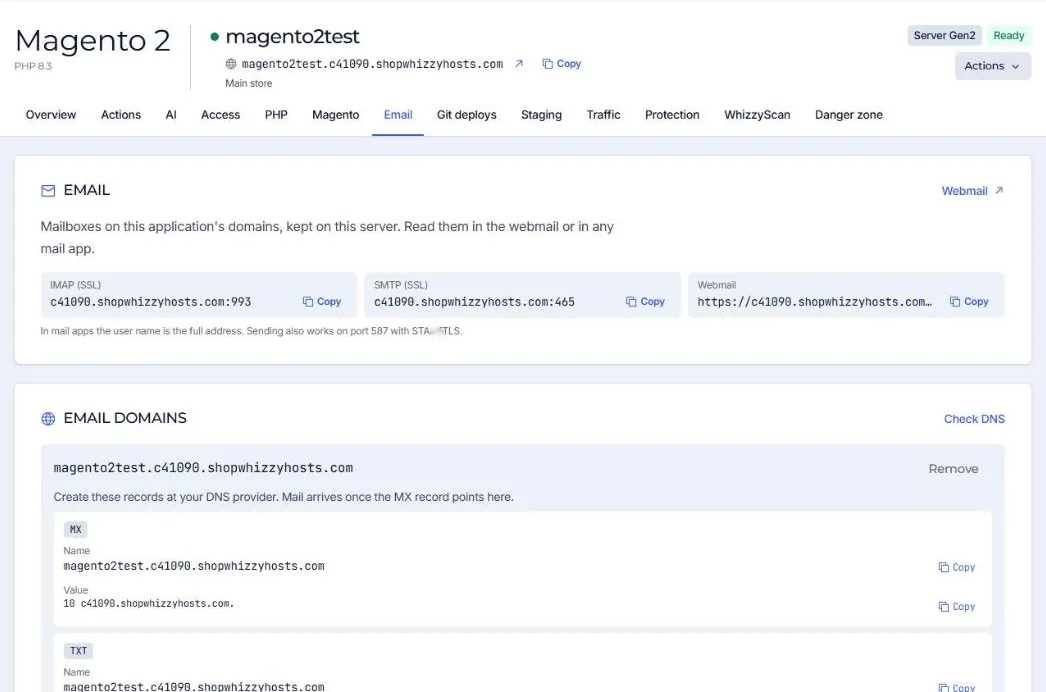
- Add an email domain
Email tab of the application. A DKIM signing key is created for the domain.
- Create the DNS records
The tab lists the records with Copy buttons: MX, SPF, DKIM and DMARC. Press Check DNS to see which are in place.
- Create mailboxes and aliases
Choose the size of each mailbox. Aliases forward an address to one or more others.
- Read the mail
Webmail at
https://<server hostname>/webmail/, or any mail app.
| Mail app setting | Value |
|---|---|
| Incoming (IMAP, SSL) | server hostname, port 993 |
| Outgoing (SMTP, SSL) | server hostname, port 465 (or 587 with STARTTLS) |
| User name | The full email address |
Mail only arrives on the server once the MX record points to it. Until then, your current provider keeps receiving it.
Many stores keep mailboxes at Google Workspace or Microsoft 365 and only send order emails from the server through an SMTP service. Both work; see SMTP relay.
Did this solve it? If not, tell us what you see and we look at your server.
Open a ticket